
Quick Answer
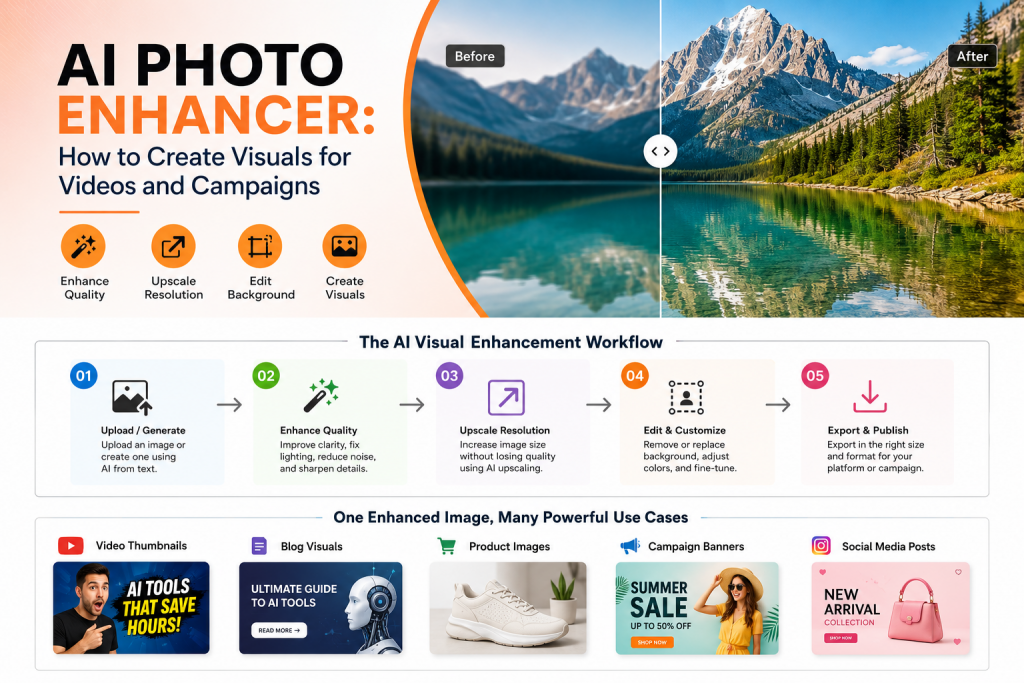
An AI photo enhancer helps creators, marketers, and business teams improve image clarity, sharpness, resolution, and overall visual quality. It can support video thumbnails, blog visuals, product images, banners, and campaign creatives by turning low-quality or unfinished visuals into cleaner, more usable marketing assets.
Good visuals can change how people respond to your content. A strong video thumbnail gets more attention, a clean product image builds trust, and a polished campaign banner makes the message easier to understand.
The problem is that most teams do not always have perfect images ready. Some visuals are blurry, low-resolution, poorly lit, badly cropped, or not ready for the platform where they need to be published.
An AI photo enhancer helps close this gap. Instead of starting again with a designer or a full photoshoot, teams can improve existing images, generate new visual ideas, edit backgrounds, upscale pictures, and prepare assets for videos, blogs, products, and campaigns faster.
In This Guide
What an AI Photo Enhancer Does
An AI photo enhancer improves an image by using artificial intelligence to sharpen details, reduce noise, correct lighting, increase resolution, and make the final visual look cleaner. It can also support related tasks like background cleanup, object adjustment, and image upscaling.
For marketing teams, the value goes beyond making a picture look better. A photo enhancer can help create stronger campaign visuals, clearer product images, better thumbnails, and more polished blog graphics without a long manual editing process.
1
Sharpen
Improve clarity, edges, details, and visual definition.
2
Upscale
Increase image size while keeping it usable.
3
Polish
Clean lighting, background, noise, and final quality.
Simple definition
An AI photo enhancer improves image quality so the visual becomes clearer, sharper, and more useful for publishing.
Why Better Visuals Matter for Videos and Campaigns
Visual quality affects how people judge your content before they read or watch anything. A blurred thumbnail can reduce interest, while a clean campaign image can make the message feel more credible.
Different channels need different visual standards. A video thumbnail needs contrast and focus. A blog image needs clarity and context. A product visual needs trust. Campaign creatives need a clean message that people can understand quickly.
| Asset Type | Common Problem | Enhancement Goal |
|---|---|---|
| Video thumbnail | Low contrast or unclear subject | Sharper focus and stronger click appeal |
| Blog visual | Generic or flat image | Better context, clarity, and polish |
| Product image | Poor lighting or background distraction | Cleaner product presentation |
| Campaign creative | Messy design or weak visual hierarchy | Clearer message and stronger brand feel |
Visual rule
Enhance the image for the channel where it will appear. A thumbnail, product image, blog banner, and ad creative should not follow the same visual treatment.
Create stronger visuals with Flonnect
Use AI to generate, enhance, customize, and prepare images for videos, campaigns, blogs, and product pages.
Step-by-Step AI Visual Asset Workflow
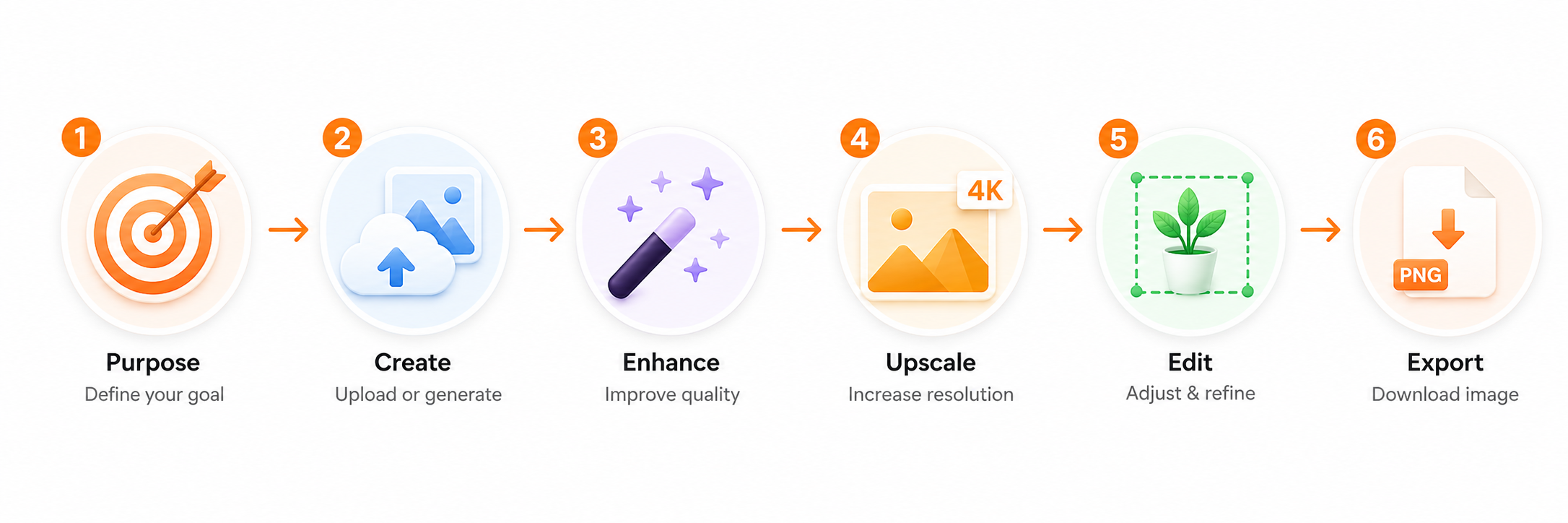
A strong visual workflow starts with the final use case, not the tool. Before enhancing an image, decide whether it will become a thumbnail, banner, blog graphic, product asset, or campaign creative.
Choose the asset purpose
Start by deciding where the visual will be used. A YouTube thumbnail needs attention, while a blog visual needs context and a product image needs clarity.
Create or upload the base image
Use an AI image generator to create a new image from text, or upload an existing picture that needs improvement.
Enhance clarity and quality
Use AI to sharpen details, improve brightness, reduce noise, and make the image clearer. This step is useful for thumbnails, banners, and reused product visuals.
Upscale for larger formats
If the image will be used as a website banner, ad creative, or large campaign visual, an image upscaler can help prepare it for bigger dimensions.
Edit background and layout
Use an AI photo editor or background remover AI workflow to clean distractions, adjust objects, and make space for text overlays.
Export for the final channel
Prepare the final size, format, and layout based on the channel. A blog image, product image, video thumbnail, and campaign banner each need different finishing details.
AI Photo Enhancer vs Image Upscaler vs AI Photo Editor
These terms are often used together, but they do not mean exactly the same thing. Knowing the difference helps teams choose the right tool for each asset.
| Tool Type | Main Job | Best Use Case |
|---|---|---|
| AI photo enhancer | Improve clarity, sharpness, lighting, and quality | Making existing visuals look cleaner |
| Image upscaler | Increase image resolution and size | Preparing images for larger formats |
| AI photo editor | Change background, objects, layout, or composition | Creating final branded campaign visuals |
| AI image creator | Generate new images from text prompts | Creating fresh ideas, concepts, and design directions |
Best practical approach
Use generation for new ideas, enhancement for clarity, upscaling for larger formats, and editing for final campaign-ready visuals.
Use Cases: Videos, Blogs, Products, and Campaigns
An artificial intelligence photo enhancer becomes more valuable when it is connected to real publishing needs. The same visual can often be improved, resized, edited, and reused across several content formats.
Video thumbnails
Use enhancement to sharpen the main subject, improve contrast, clean the background, and make space for short thumbnail text. If the image supports a video made through an AI video generator, keep the visual style consistent with the video theme.
Blog visuals
Blog images should support the topic quickly. Enhance clarity, remove distractions, and use visuals that match the article’s intent instead of generic stock-style graphics.
Product images
Product visuals need trust. Improve lighting, increase image clarity, clean the background, and keep the product easy to understand at first glance.
Campaign creatives
Campaign visuals need strong hierarchy. Use AI to create or enhance a clean background, then add copy, offer, product focus, and brand elements in a balanced layout.
Where Flonnect Fits in the AI Visual Workflow
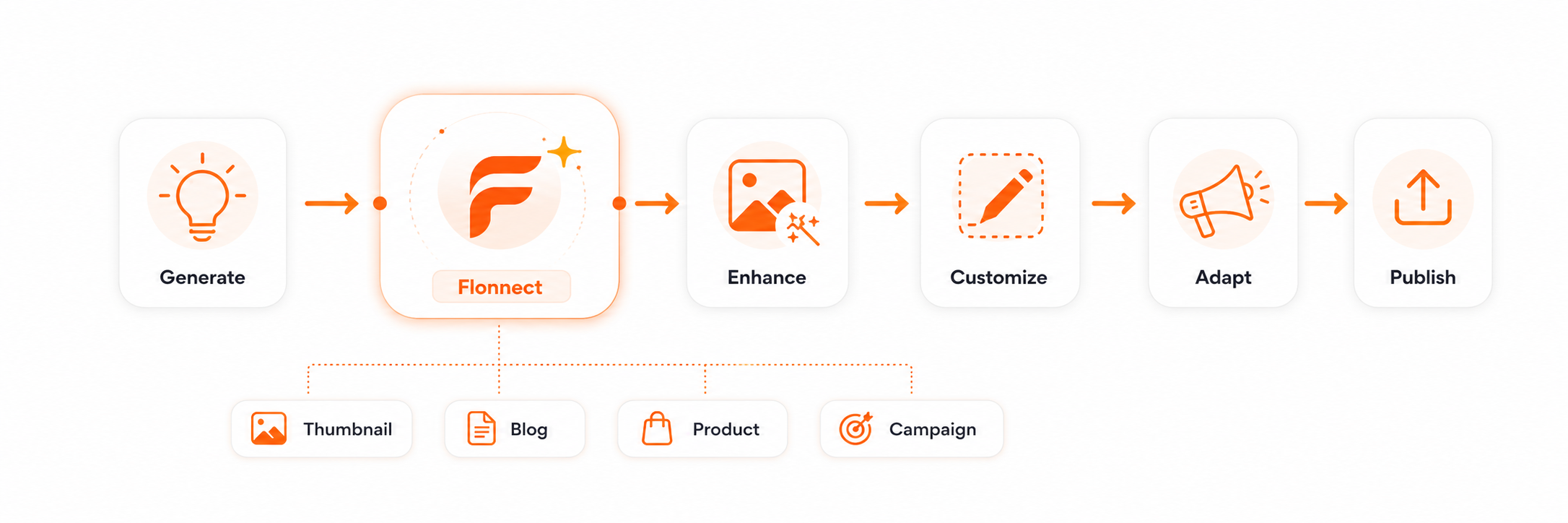
Flonnect helps teams create and improve visuals without needing advanced design skills. The Flonnect AI Image Generator can turn text prompts into high-quality images, while supporting visual styles and customization for different content needs.
Once the image direction is ready, teams can use the AI photo editor to refine the visual. Teams producing videos can also connect their image workflow with the AI video editor for thumbnails, overlays, and supporting assets.
| Workflow Stage | Team Need | Flonnect Use |
|---|---|---|
| Generate | Create new image ideas from prompts | Use text-to-image generation for fresh visuals. |
| Customize | Match the image style to the campaign | Choose realistic, artistic, abstract, cartoon, or other styles. |
| Improve | Make visuals clearer and sharper | Prepare higher-quality images for publishing. |
| Repurpose | Use one asset across multiple channels | Adapt visuals for thumbnails, blogs, videos, and campaigns. |
Workflow tip
Create one strong master visual first. After that, resize and adapt it into a thumbnail, blog banner, social graphic, product image, or campaign creative.
Mistakes to Avoid When Enhancing AI Visuals
Mistake 1: Enhancing without a clear purpose
A visual should be improved for a specific channel. Enhancing an image without knowing its final use can lead to the wrong size, crop, contrast, or layout.
Mistake 2: Over-sharpening the image
Too much sharpening can make images look artificial. Aim for natural clarity rather than harsh edges or unrealistic texture.
Mistake 3: Ignoring brand consistency
A polished image can still feel wrong if it does not match your colors, tone, audience, or campaign message.
Mistake 4: Using the same image everywhere
A YouTube thumbnail, blog banner, product image, and ad creative need different crops, spacing, and visual hierarchy.
Pre-Publish Checklist for AI-Enhanced Images
Before publishing, check:
✓ Is the image clear at the final size?
✓ Does the image match the campaign or content goal?
✓ Is the subject easy to understand quickly?
✓ Are text areas clean and readable?
✓ Does the image fit the required platform size?
✓ Is the background clean and distraction-free?
✓ Does the final output feel consistent with your brand?
Create sharper campaign visuals with Flonnect
Use Flonnect to generate, enhance, edit, and repurpose visuals for videos, blogs, product pages, and marketing campaigns.
For creators, marketers, business teams, educators, and campaign teams.
Frequently Asked Questions