
Quick Answer
An AI video summarizer helps teams turn long videos into short summaries, key points, timestamps, clips, transcripts, and reusable content ideas. For business videos and tutorials, the best workflow is not just summarizing the video. Teams should summarize, edit, repurpose, create supporting visuals, and publish the content in formats that are easier to watch and share.
Business teams create more video content than ever. Webinars, product demos, tutorials, onboarding videos, training sessions, customer support recordings, and creator videos all contain useful information.
The real problem starts after recording. A 45-minute webinar may have only five strong takeaways. A long product demo may need a short recap for sales. A tutorial may include useful steps, but viewers may not want to watch the full recording.
This is where AI video summarizer tools become useful. They help teams understand long videos faster, extract the important parts, and turn raw recordings into business-ready assets like clips, posts, notes, tutorials, and summaries.
In This Guide
Why Long Videos Slow Teams Down
Long videos are valuable, but they are not always easy to use. A founder may record a product walkthrough, a marketer may host a webinar, and a creator may publish a tutorial. Each video may contain strong ideas, yet those ideas stay buried if nobody has time to review the full recording.
Manual review also slows down repurposing. Someone has to watch the video, write notes, find timestamps, extract quotes, create clips, write social captions, and prepare follow-up content. That is a lot of work from one recording.
| Long Video Type | Common Problem | What a Summary Helps With |
|---|---|---|
| Webinar | Too many ideas spread across a long session | Key takeaways, timestamps, and follow-up content |
| Product demo | Important benefits get buried in the walkthrough | Short sales recap and demo highlights |
| Tutorial | Viewers may need only a few steps | Step summary and chapter-style outline |
| Support video | Users want the answer quickly | Issue summary, fix steps, and short help note |
Practical point
A summary is useful only when it helps someone act faster. For business teams, that action may be editing, sharing, training, publishing, or creating follow-up content.
What an AI Video Summarizer Really Helps You Do
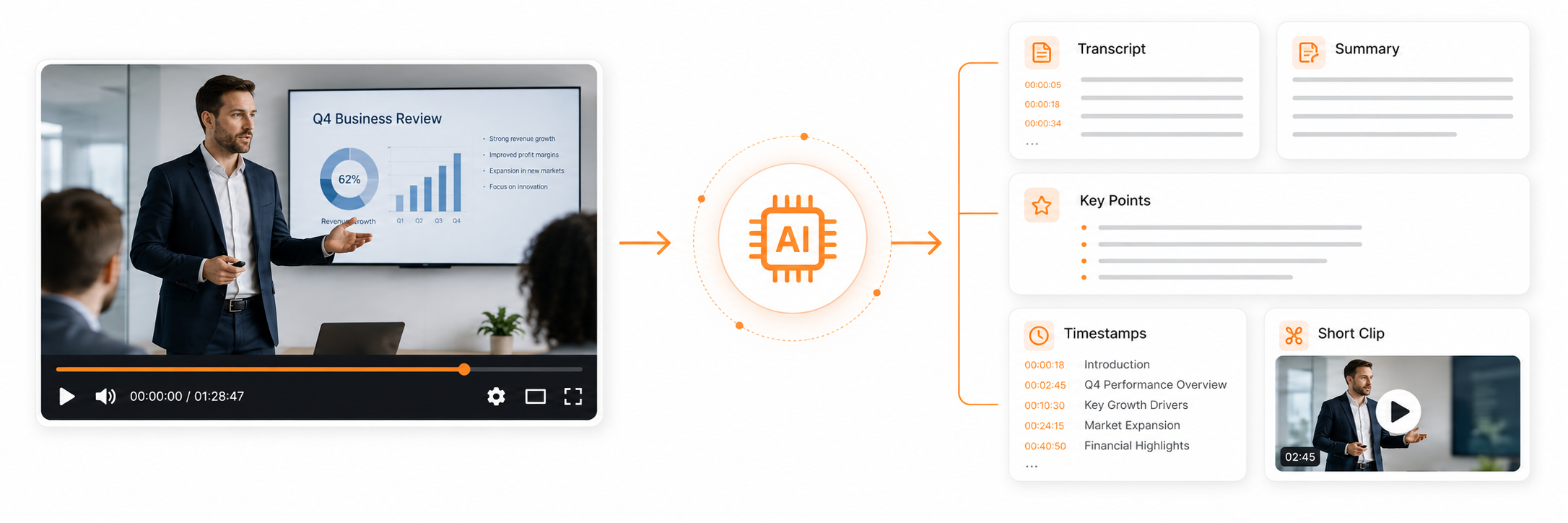
An AI video summarizer reviews video content and extracts the most useful information. Depending on the tool, it may create a short summary, key moments, a transcript, timestamps, subtitles, speaker labels, or a list of action points.
The best tools do more than reduce video length. They help teams understand what matters, where it appears, and how it can be reused. That is why summarization becomes more powerful when connected to editing and publishing.
1
Extract
Find key points, important moments, and useful quotes.
2
Organize
Turn long recordings into summaries, chapters, and notes.
3
Repurpose
Create clips, posts, blog recaps, and training assets.
Simple definition
An AI video summarizer turns a long video into shorter, organized information that teams can review, edit, share, and reuse faster.
Create and repurpose business videos faster
Use Flonnect to create videos from text, photos, or scripts, then refine and repurpose them for campaigns, tutorials, and social content.
Where AI Video Summaries Help Most in Business Workflows
Different teams use summaries in different ways. A marketer may need social clips from a webinar. A founder may want a product demo recap. A support team may need a short issue-resolution note from a help video.
Marketing teams
Summaries help marketers turn webinars, interviews, demo recordings, and product explainers into short content ideas. A single recording can become social captions, campaign hooks, email snippets, and short clips.
Founders and small teams
Founders often record product walkthroughs, pitch videos, and customer demos. An AI summary can capture the strongest points, making it easier to create landing page copy, sales notes, or investor-ready explanations.
Creators and educators
Tutorials, lessons, and explainers can be long because they teach step by step. Summaries help extract chapters, learning outcomes, recap notes, and short educational clips.
Support and training teams
Support videos often need speed more than storytelling. A summary can turn a long walkthrough into quick fix steps, a knowledge-base draft, or a shorter customer response.
What to Look for in the Best AI Video Summarizer Tools
Not every summarizer is useful for business work. A simple paragraph summary may be enough for personal viewing, but teams usually need more structure. Look for outputs that can move directly into editing, posting, documentation, or training.
| Feature | Why It Matters | Best For |
|---|---|---|
| Key moments | Helps teams find strong sections without watching everything | Clips, reels, demo highlights |
| Timestamped summary | Makes review and editing faster | Webinars, tutorials, support videos |
| Transcript | Turns spoken content into reusable text | Blogs, emails, documentation |
| Subtitles | Improves accessibility and silent viewing | Social videos, tutorials, training clips |
| Repurposing support | Helps turn one recording into multiple assets | Marketing and content teams |
Best practical approach
Choose a summarizer based on what you want to do after the summary. If the goal is publishing, look for outputs that support editing, captions, clips, and social repurposing.
From One Long Video to Many Useful Assets
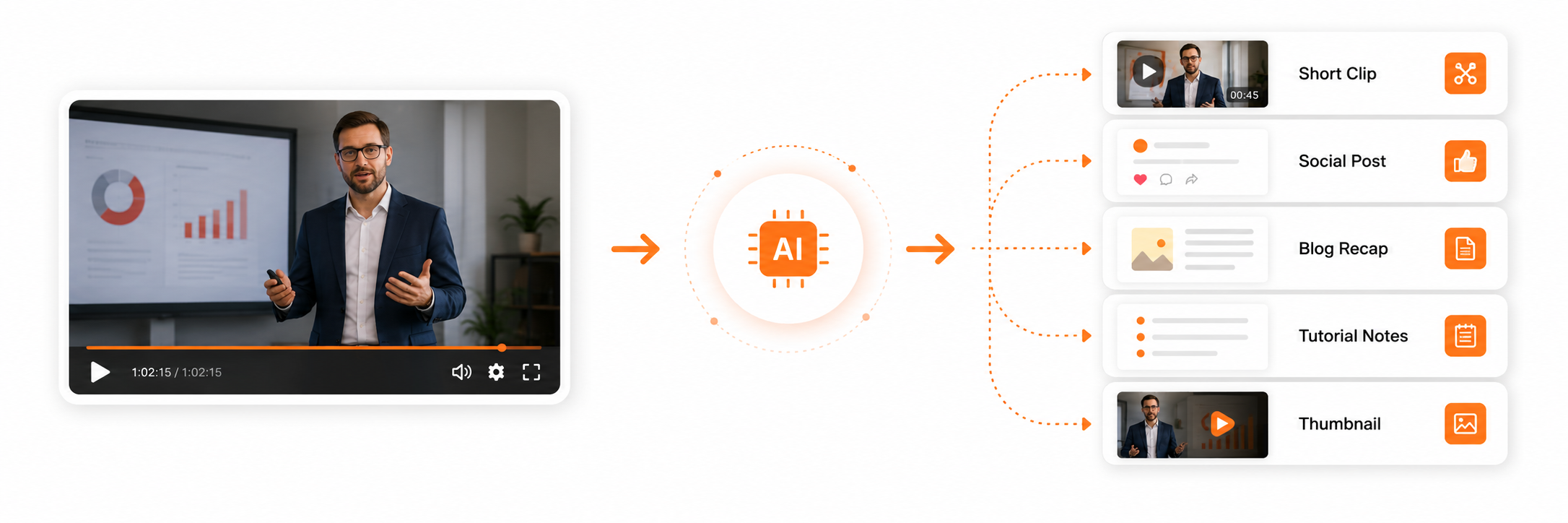 The best use of an AI video summarizer is not only saving time. The real benefit comes when the summary becomes a content engine. A single business video can feed multiple channels when the team knows how to reuse it.
| Original Video | Summary Output | Repurposed Asset |
|---|---|---|
| Webinar | Top lessons and timestamps | Blog recap, email summary, LinkedIn post |
| Product demo | Feature highlights | Sales clip, landing page video, product teaser |
| Tutorial | Step-by-step recap | Help article, short tutorial, training note |
| Interview | Key quotes and themes | Social graphics, creator clips, newsletter ideas |
Workflow tip
Start with the summary, then decide the asset. Do not clip random moments before knowing what message the new content should deliver.
How Flonnect Supports the Create, Edit, and Repurpose Flow
Flonnect fits into the workflow after a team has identified the message they want to create or repurpose. The AI Video Generator can help create videos from text, photos, or scripts, while the AI Video Editor helps refine and polish video content with smart automation.
Once the summary gives you the strongest ideas, you can turn them into new assets. Use the AI Social Media Post Creator for captions and social copy, the AI Image Generator for supporting visuals, and the AI Photo Editor to clean or improve campaign graphics.
| Stage | Team Action | Flonnect Role |
|---|---|---|
| Create | Turn a script or idea into a video | Use AI video generation for new drafts. |
| Edit | Trim, refine, and polish the content | Use AI editing to improve final output. |
| Promote | Create captions and posts from the summary | Use AI social content tools for distribution. |
| Visualize | Create thumbnails or supporting graphics | Use image and photo tools for visuals. |
Flonnect angle
Use the summary to identify what matters. Then use AI creation, editing, social, and visual tools to turn those takeaways into publish-ready content.
Common Mistakes When Summarizing Business Videos
Mistake 1: Treating the summary as the final content
A summary is a starting point. It still needs editing, context, brand voice, and formatting before it becomes a blog, post, clip, or help article.
Mistake 2: Ignoring timestamps
Timestamps make summaries easier to verify and edit. Without them, teams may waste time finding the original moment again.
Mistake 3: Summarizing without a goal
A summary for a sales clip should look different from a summary for training notes. Decide the final use before choosing the output format.
Mistake 4: Skipping human review
AI can miss nuance, context, or intent. A human should review the summary before it becomes customer-facing content.
A Simple Review Checklist Before Publishing
Before turning a summary into content, check:
✓ Does the summary capture the real message?
✓ Are timestamps available for important moments?
✓ Are quotes, claims, and product details accurate?
✓ Is the output useful for a specific channel?
✓ Does the content need editing before publishing?
✓ Can the same summary become more than one asset?
✓ Has a human reviewed the final version?
Turn video ideas into publish-ready assets with Flonnect
Use Flonnect to create, edit, and repurpose video content for tutorials, demos, campaigns, social posts, and business communication.
For marketers, founders, creators, educators, and small business teams.
Frequently Asked Questions