
Quick Answer
- Give developers reproducible evidence, not just a bug description.
- Combine steps, screen video, expected vs actual behavior, environment and technical logs.
- Keep QA, developers and product teams inside one clear issue workflow.
- Assign an owner and define what “fixed” means before development starts.
- Use a bug reporting tool to capture context automatically instead of rebuilding it through follow-up messages.
Good developer collaboration is not more Slack messages or another status meeting. It is making sure the first bug report contains enough evidence for a developer to reproduce, investigate and fix the problem without starting a question-and-answer thread. Flonnect’s recent video troubleshooting guide shows why visual reproduction is especially useful when text cannot explain the exact sequence that triggered a bug.
In This Guide
Why Bug Fixing Turns Into Ticket Ping-Pong
A weak ticket usually starts simply: “Checkout is broken.” Then the questions begin.
The problem is not that people are refusing to collaborate. The problem is that the evidence arrived in pieces. Better collaboration moves those questions before ticket submission.
Why Cleaner Developer Collaboration Matters Now
7 hrs
lost per DevSecOps professional each week to inefficient processes.
60%
use more than five software-development tools.
90%
of DORA respondents reported using AI at work.
30%
reported little or no trust in AI-generated code.
Sources: GitLab Global DevSecOps research released for 2026; Google DORA State of AI-Assisted Software Development 2025.
AI may speed up coding and AI for QA testing can speed up detection, but fragmented handoffs can simply move the bottleneck downstream. The workflow around the tools still matters.
The 5-Minute Developer Handoff Test
Before assigning a bug, imagine the developer opens the ticket five minutes later with no additional context. Can they answer all five questions?
- Where did it happen? URL, feature, build and environment.
- How do I reproduce it? A reliable sequence from the correct starting state.
- What should happen? The expected result.
- What actually happened? Visible failure plus relevant error evidence.
- Why does it matter? User impact, severity or blocked workflow.
Simple rule
If the developer must message QA to discover one of these basics, the ticket was assigned too early.
A Better Developer Collaboration Workflow for Bug Fixing
1. Reproduce Before You Report
Run the flow again before submitting the issue. Separate real product defects from stale sessions, test-data problems or one-off environment failures.
2. Record the Full Failure Path
Do not start the recording after the error appears. Begin from the state a developer can reproduce. A short screen video can preserve click order, timing and UI state that screenshots miss.
3. Attach Technical Context at the Same Time
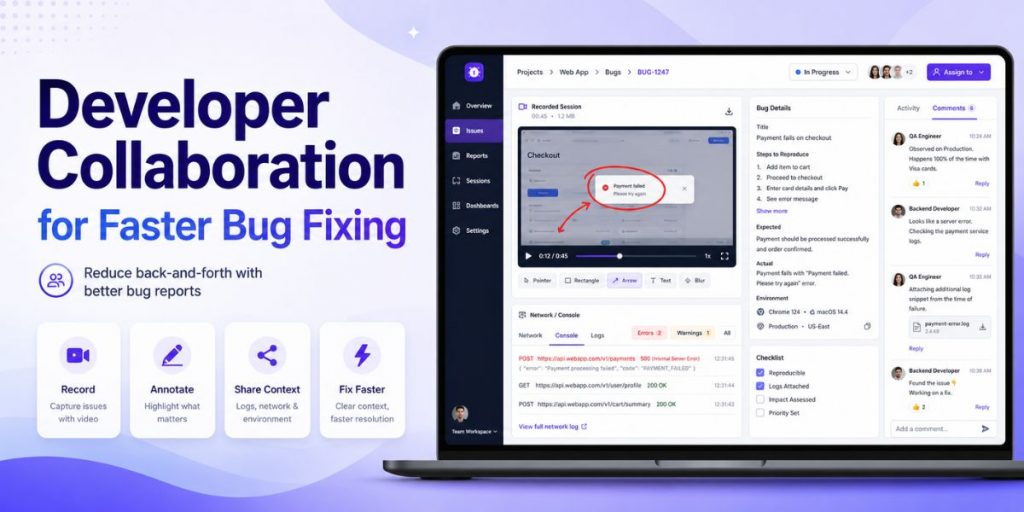
For web bugs, capture failed requests, response codes and relevant network information while reproducing the problem. Flonnect’s bug reporting tool combines image or video capture with annotations and network/API context so the visual failure and technical evidence remain connected.
4. Write Expected vs. Actual Precisely
| Avoid | Use Instead |
|---|---|
| “Login doesn’t work.” | “After valid credentials are submitted, the user remains on /login instead of opening the dashboard.” |
| “API error.” | “POST /checkout returns 500 after payment confirmation; expected order confirmation.” |
5. Give the Ticket One Owner and One Destination
Do not let evidence live in Slack, screenshots in email and acceptance criteria somewhere else. Keep the issue linked to the team’s tracker and assign a clear owner.
6. Define the Verification Path Before the Fix
QA should know how the fix will be retested. For recurring flows, a documented reproduction path becomes reusable regression knowledge. Flonnect’s recent process documentation guide shows how repeated workflows can be turned into reusable step-by-step documentation.
Copy This Developer-Ready Bug Report Template
OWNER:
SEVERITY:
BUILD / VERSION:
BROWSER / OS / DEVICE:
USER IMPACT:
Who is affected and what is blocked?
STEPS TO REPRODUCE:
1.
2.
3.
EXPECTED RESULT:
ACTUAL RESULT:
VIDEO / SCREENSHOT:
ANNOTATED BUG MOMENT:
NETWORK / API CONTEXT:
Endpoint:
Status:
Relevant response:
FIX ACCEPTANCE CRITERIA:
What must work before QA closes this issue?
Where AI Helps Developer Collaboration—and Where It Does Not
AI can help generate test cases, summarize failures, suggest likely causes and organize technical information. But AI does not remove the need to prove what happened in the real application.
- Use AI for: repetitive analysis, test generation, summaries and initial triage.
- Use direct evidence for: user behavior, visual bugs, timing, environment and failed requests.
- Keep humans responsible for: severity, business impact, release decisions and final verification.
Give developers the bug context before they have to ask
Capture the failure visually, mark the exact moment, preserve network and API context, and move the report into your existing development workflow.
Frequently Asked Questions
What is developer collaboration in bug fixing?
It is the process of QA, developers, product managers and support teams sharing enough evidence, ownership and acceptance criteria to move a defect from discovery to verified fix efficiently.
What information reduces back-and-forth the most?
Start with reproducible steps, expected versus actual behavior, environment, a focused screen recording and relevant technical evidence such as failed network requests or error logs.
Are screenshots enough for bug reporting?
Screenshots work for simple visual defects. Video is more useful when the bug depends on a sequence of actions, timing, navigation or a state change.
How do bug reporting tools improve collaboration?
The best bug reporting tools reduce manual context gathering by packaging visual evidence and technical information with the issue instead of forcing developers to request each missing detail separately.
Can AI eliminate developer and QA communication?
No. AI can reduce repetitive work, but teams still need communication for product intent, severity, edge cases, technical judgment and verification. The goal is fewer unnecessary questions—not zero collaboration.